Aug 2024
Build a Virtual Private Cloud (VPC)
When I'm learning the AWS services, I initially found it tricky to grasp the relationships between the key components of a VPC. In this project, I learned the core essentials of building an Amazon Virtual Private Cloud (VPC), which has helped me to get a better understanding of the purposes and raltionship of the VPC set up.
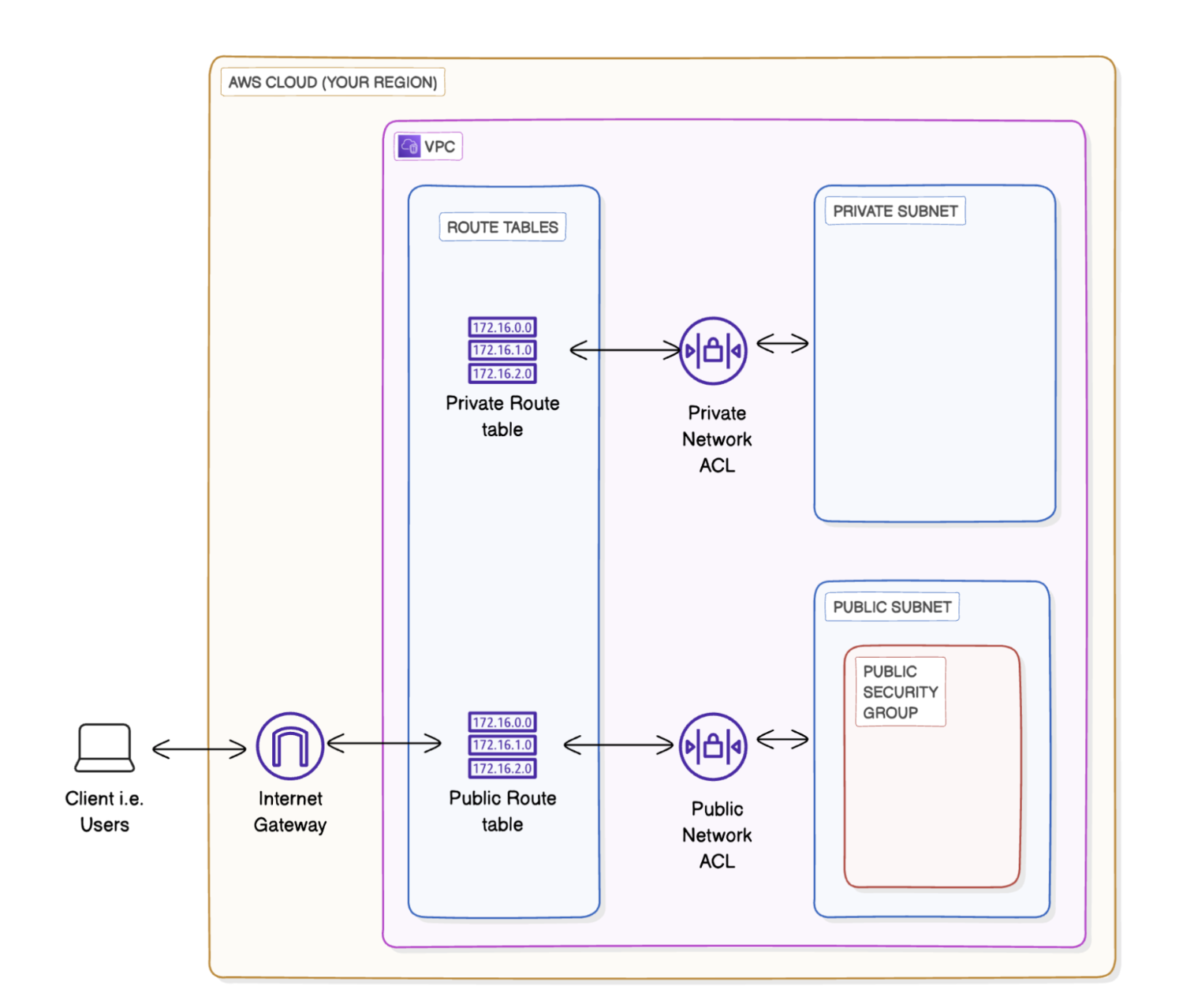
In this project, I created:
- 💡 An Amazon VPC with configured IPv4 CIDR block
- 💡 A public subnet with auto-assigned public IP addresses
- 💡 An internet gateway associate to the VPC
- 💡 A route table to send Internet-bound traffic to your internet gateway
- 💡 A security group to control inbound and outbound traffic at a resource level, specifying allowed IP addresses, protocols, and ports.
- 💡 A network ACL (Access Control List) as an additional layer of security, managing both incoming and outgoing traffic at the subnet level.
- 💡 A private subnet with a different CIDR block to avoid an overlap with your public subnet.
- 💡 A private route table that only allow local target.
- 💡 A private network ACL that deny both inbound and outbound traffic.
After working through the process, I conclude the relationships of the VPC components below:
- AWS Cloud Region - Country
- VPC - City
- Subnet - Neighbourhood in the city
- Internet gateway - GPS in the city
Network ACLs - Security guard at your neighbourhood entrance and exit
- Resources - Buildings in your neighbourhood
Security group - A security guard at your building entrance and exit
- IP address - Street addresses for the resources
Protocols (ex. HTTP, FTP) - Different vehicles that deliver data in different ways
Port numbers - Delivery dock at the building for a specific vehicle (protocol)
📸 Dive deeper into my journey by checking out the documentation below:
📝 Create VPC, Subnet, and Internet Gateway
📝 Setup Security Group and Network ACL
📝 Create a private subnet